Helmfile – Simplify Kubernetes Helm Management
Manage multiple Helm charts and Kubernetes deployments from a single declarative configuration. Automate releases, streamline environments, and maintain infrastructure with confidence using Helmfile.
12k+
GitHub Stars
2M+
Downloads
500+
Contributors
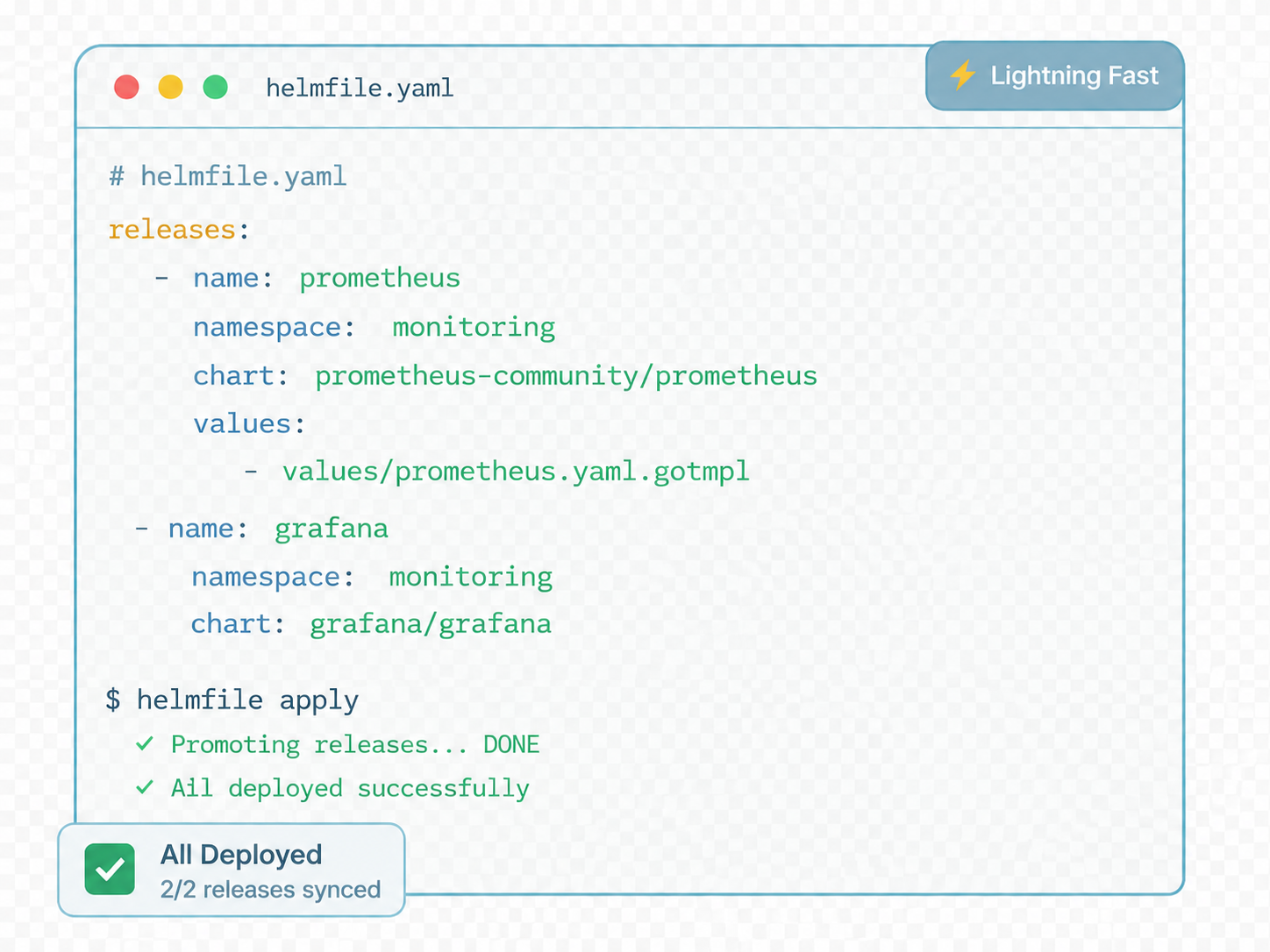
Trusted By Teams At Leading Companies
Simplify Complex Helm Deployments
Helmfile is a powerful declarative tool that simplifies the management of multiple Helm charts and Kubernetes deployments. Instead of handling individual Helm releases separately, Helmfile allows teams to define and manage all releases, environments, dependencies, and configuration values from a single centralized file.
By keeping deployment configurations in version control, Helmfile enables teams to track changes, collaborate effectively, and implement reliable deployment workflows across development, staging, and production environments. It serves as a management layer for Helm, helping organizations standardize and automate their Kubernetes deployment processes.
Centralized Helm Management
Manage multiple Helm releases from a single configuration file, providing better visibility and control over Kubernetes deployments.
Reduced Deployment Complexity
Simplify complex deployment workflows by organizing charts, values, and dependencies in a structured and declarative format.
Consistent Environment Configurations
Maintain uniform configurations across development, staging, testing, and production environments while minimizing configuration drift.
Better Collaboration Through Git
Store Helmfile configurations in version control systems, enabling teams to track changes, review updates, and collaborate more effectively.
Automated Deployment Workflows
Integrate Helmfile with CI/CD pipelines to automate deployments, reduce manual intervention, and improve operational efficiency.
Scalable Kubernetes Operations
Standardize deployment practices across clusters while maintaining flexibility for growing infrastructure requirements.
Everything Needed to Manage Helm at Scale
Helmfile provides a comprehensive set of features designed to simplify Helm chart management and Kubernetes deployments. Whether you are operating a small cluster or managing large-scale infrastructure, Helmfile helps maintain consistency, automation, and control throughout the deployment lifecycle.
Release Management
Manage multiple Helm releases from a single declarative configuration file, simplifying deployment operations across Kubernetes environments.
Environment Configuration
Create dedicated development, staging, testing, and production configurations while sharing common settings where required.
Templating Support
Reduce duplication and improve consistency with reusable templates, variables, and deployment patterns.
Secret Management
Securely manage credentials, certificates, passwords, and API keys through integrated secret management workflows.
State Synchronization
Keep Kubernetes clusters aligned with the desired state defined within Helmfile configurations.
Drift Detection
Identify configuration inconsistencies and unauthorized changes before they impact production workloads.
Dependency Management
Control deployment order and manage relationships between infrastructure and application components.
Version Control Integration
Store configurations in Git repositories to support auditing, collaboration, GitOps, and rollback capabilities.
CI/CD Automation
Integrate with modern CI/CD pipelines to automate deployments and improve release reliability.
Scalable Infrastructure Management
Manage growing Kubernetes environments with a structured and repeatable deployment strategy.
A Simple Deployment Workflow
Helmfile streamlines Kubernetes deployment management by providing a declarative workflow for defining, organizing, and deploying Helm releases. Instead of managing each release individually, teams can maintain a single source of truth that describes the desired state of their infrastructure and applications.
Create a Helmfile Configuration
Begin by creating a helmfile.yaml file that serves as the central configuration for your deployments. This file defines repositories, releases, environments, and deployment settings.
Define Releases and Values Files
Add the Helm releases you want to manage and specify corresponding values files. Helmfile supports reusable templates and environment-specific configurations.
Store Configuration in Git
Keep Helmfile configurations and deployment definitions in Git repositories to track changes, review updates, and maintain complete deployment history.
Run Helmfile Commands
Validate configurations, preview changes, synchronize releases, and manage deployments. Helmfile calculates the desired state automatically.
Deploy and Synchronize Resources
Helmfile applies the necessary changes and keeps Kubernetes resources synchronized with the declared configuration across environments.
Reliable, Automated Kubernetes Deployments
By following this workflow, teams can automate Helm chart management, improve deployment reliability, reduce configuration drift, and maintain consistent Kubernetes environments at scale.
Modern Kubernetes Deployment Management
As Kubernetes environments expand, managing multiple Helm charts manually becomes increasingly complex and time-consuming. Helmfile addresses these challenges by providing a declarative and centralized approach to Helm chart management, helping teams deploy applications more efficiently and reliably.
By defining the desired state of deployments in a single configuration file, Helmfile simplifies infrastructure management, improves collaboration, and reduces configuration risks while enabling organizations to scale Kubernetes operations with confidence.
Declarative Infrastructure
Define the desired state of Helm releases using YAML configurations that are easy to manage, understand, and reproduce.
Git-Based Workflows
Use Git repositories as a single source of truth with version control, auditing, collaboration, and rollback capabilities.
Multi-Environment Support
Manage development, testing, staging, and production environments through a unified deployment structure.
CI/CD Ready
Integrate Helmfile seamlessly into automated pipelines to accelerate releases and improve deployment consistency.
Dependency Management
Control deployment order and ensure infrastructure and application dependencies are deployed correctly.
Reduced Human Error
Standardize deployment workflows and eliminate repetitive manual tasks that often lead to configuration mistakes.
Improved Scalability
Support growing Kubernetes infrastructures with a structured framework built for long-term operational growth.
Enhanced Operational Efficiency
Spend less time on manual administration and more time delivering reliable applications and infrastructure improvements.
Common Commands Every User Should Know
Helmfile provides a set of powerful commands that simplify the management of Helm releases and Kubernetes deployments. These commands help users preview changes, synchronize environments, deploy applications, and maintain cluster consistency through a declarative workflow.
helmfile apply
Apply configuration changes to the Kubernetes cluster. This command compares the desired state with the current cluster state and performs required updates.
helmfile sync
Synchronize all defined Helm releases with the desired configuration. Helmfile installs, upgrades, and updates releases automatically.
helmfile diff
Preview differences between the current cluster state and desired configuration before applying any changes.
helmfile template
Render Kubernetes manifests locally without deploying them. Ideal for validation, debugging, and reviews.
helmfile destroy
Remove all Helm releases managed by the current Helmfile configuration when environments need cleanup.
helmfile list
Display all Helm releases managed by Helmfile, helping teams track deployment status and visibility.
Why These Commands Matter
Together, these commands provide a complete workflow for managing Kubernetes deployments with Helmfile. From reviewing proposed changes and rendering manifests to synchronizing releases and cleaning up resources, Helmfile commands help teams automate deployment operations while maintaining consistency, reliability, and control across Kubernetes environments.
Where Helmfile Delivers the Most Value
Helmfile is designed to simplify Kubernetes deployment management in environments where multiple applications, services, and teams must work together efficiently. Its declarative approach, automation capabilities, and support for large-scale infrastructure make it valuable across a wide range of deployment scenarios.
Enterprise Kubernetes Platforms
Centralize and manage hundreds of Helm releases across multiple clusters while maintaining consistency and operational control.
GitOps Implementations
Store deployment definitions in Git repositories and automate infrastructure management through Git-based workflows.
Multi-Tenant Kubernetes Environments
Standardize deployment practices across teams while supporting environment-specific configurations and templates.
Continuous Delivery Pipelines
Integrate with CI/CD platforms to automate releases, reduce manual effort, and improve deployment reliability.
Platform Engineering Teams
Establish reusable deployment standards and simplify onboarding through centralized configuration management.
Microservices Architectures
Coordinate deployments of interconnected services while managing dependencies and environment settings.
Multi-Environment Deployments
Manage development, testing, staging, and production environments from a unified configuration structure.
Infrastructure Standardization
Apply repeatable deployment patterns consistently across projects, clusters, and business units.
Disaster Recovery & Reproducibility
Recreate environments quickly using infrastructure as code and version-controlled deployment definitions.
Large-Scale Kubernetes Operations
Manage complex Kubernetes ecosystems with improved visibility, governance, and deployment consistency.
Understanding the Difference
While Helm is the standard package manager for Kubernetes, it is primarily designed to manage individual chart releases. Helmfile extends Helm by providing a declarative layer that enables centralized management, automation, and improved deployment consistency across environments.
Helmfile does not replace Helm—it works alongside it. Helm remains responsible for installing and managing charts, while Helmfile orchestrates multiple releases through a single configuration file.
| Feature | Helm | Helmfile |
|---|---|---|
| Single Chart Management | ✓ Yes | ✓ Yes |
| Multiple Release Management | Limited | ✓ Yes |
| Environment Support | Basic | Advanced |
| GitOps Workflows | Partial | Excellent |
| Deployment Automation | Moderate | Advanced |
| Centralized Configuration | No | ✓ Yes |
When to Use Helm
- Managing a small number of applications.
- Working with simple Kubernetes deployments.
- Requiring basic chart installation and upgrades.
- Environment management needs are minimal.
When to Use Helmfile
- Managing multiple Helm releases.
- Operating across several environments.
- Implementing GitOps workflows.
- Automating complex deployment processes.
- Standardizing Kubernetes operations across teams.
- Managing large-scale Kubernetes infrastructure.
Why Teams Choose Helmfile
As Kubernetes environments become more complex, organizations need tools that simplify deployment management while maintaining consistency and reliability. Helmfile helps teams streamline operations through centralized configuration management, automation, and repeatable deployment workflows.
Helmfile
Deployment Control Hub
Faster Deployments
Automate release management and reduce deployment time across Kubernetes environments.
Better Configuration Management
Maintain a centralized source of truth for infrastructure and application configurations.
Easier Environment Handling
Manage development, testing, staging, and production environments efficiently.
Improved Release Consistency
Ensure deployments remain consistent across clusters through declarative configurations.
Simplified Kubernetes Operations
Oversee multiple applications and Helm releases from a structured workflow.
Reduced Configuration Drift
Keep infrastructure aligned with the desired state and identify unwanted changes.
Enhanced Team Collaboration
Track, review, and audit deployment changes through version-controlled workflows.
Better Scalability
Support growing Kubernetes environments without increasing operational complexity.
Increased Automation
Integrate with CI/CD pipelines to automate repetitive deployment operations.
Stronger Operational Control
Gain visibility, consistency, and governance across Kubernetes infrastructure.
Long-Term Maintainability
Standardize deployment practices and simplify future infrastructure growth.
Example Helmfile Configuration
The following example demonstrates how Helmfile organizes repositories, releases, values files, and environment definitions within a single declarative configuration. This structure helps teams manage Kubernetes deployments consistently across multiple environments while keeping configurations organized and maintainable.
repositories:
  - name: bitnami
    url: https://charts.bitnami.com/bitnami

environments:
  development:
    values:
      - environments/development.yaml

  staging:
    values:
      - environments/staging.yaml

  production:
    values:
      - environments/production.yaml

releases:
  - name: nginx
    namespace: web
    chart: bitnami/nginx
    version: 18.1.0
    values:
      - values/nginx.yaml
      - values/common.yaml

  - name: redis
    namespace: database
    chart: bitnami/redis
    version: 21.0.0
    values:
      - values/redis.yaml
      - values/common.yaml
Repository Configuration
Repositories define where Helm charts are stored and retrieved. Helmfile allows multiple chart repositories to be configured centrally.
Environment Definitions
Separate configurations for development, staging, and production while maintaining shared deployment standards.
Release Management
Define chart sources, namespaces, versions, and deployment settings through a centralized release structure.
Values Files
Combine reusable and environment-specific configurations to simplify application management at scale.
Why This Structure Works
By organizing repositories, releases, values files, and environments within a single Helmfile configuration, teams can manage complex Kubernetes deployments more efficiently while maintaining clarity, consistency, and control.
Improve Your Helmfile Skills
Whether you are new to Helmfile or looking to optimize large-scale Kubernetes deployments, the right learning resources can help you build expertise and adopt best practices more effectively. Explore guides, tutorials, examples, and documentation designed to support every stage of your Helmfile journey.
Helmfile Installation Guide
Learn installation, setup requirements, repository configuration, and initial deployment steps to start using Helmfile efficiently.
Beginner Tutorials
Follow practical tutorials covering release management, values files, environment handling, and day-to-day workflows.
Advanced Configuration Examples
Explore multi-environment deployments, reusable templates, dependency management, and enterprise-scale configurations.
Best Practices
Discover proven strategies for project organization, consistency management, scalability, and maintainability.
CI/CD Integration Guides
Learn deployment automation, release workflows, configuration validation, and continuous delivery techniques.
Troubleshooting Documentation
Understand error resolution, deployment troubleshooting, cluster maintenance, and operational diagnostics.
What You Will Learn
Build Expertise with Helmfile
By leveraging these learning resources, teams can accelerate adoption, improve deployment consistency, and gain the knowledge needed to manage Kubernetes applications efficiently using Helmfile. From beginner concepts to advanced deployment strategies, these materials provide a strong foundation for long-term success.
What DevOps Teams Say About Helmfile
Helmfile has become a popular choice among DevOps engineers, platform teams, and Kubernetes administrators who need a more structured way to manage Helm deployments. Users frequently highlight its ability to simplify complex environments, improve deployment consistency, and reduce operational overhead.
4.9
Senior DevOps Engineer
Enterprise Kubernetes Platform“Helmfile has significantly improved the reliability of our Kubernetes deployments. Having all releases defined in a single configuration helps us maintain consistency across environments and reduces deployment-related issues.”
Platform Engineer
Cloud Infrastructure Team“Managing dozens of Helm releases used to be challenging. Helmfile gives us a centralized view of our deployments, making configuration management much easier.”
Site Reliability Engineer
Multi-Cluster Environment“What once required multiple Helm commands and manual updates can now be handled through a single Helmfile workflow. It has saved our team countless hours.”
DevOps Lead
CI/CD Operations Team“Helmfile integrates perfectly with our CI/CD pipelines. Automated deployments are more reliable, and managing environment-specific configurations is far simpler than before.”
Trusted by Modern Kubernetes Teams
Organizations implementing DevOps and GitOps practices often highlight Helmfile's automation capabilities as one of its most valuable features. Teams report improved deployment speed, better operational consistency, simplified release management, and stronger infrastructure governance across Kubernetes environments.
Common Questions About Helmfile
Find answers to the most frequently asked questions about Helmfile, including installation, configuration, commands, environments, CI/CD integration, and troubleshooting.
General Questions
Helmfile is a declarative tool for managing multiple Helm releases and Kubernetes deployments from a centralized configuration file.
Helm manages individual chart deployments, while Helmfile organizes multiple releases, environments, and configurations through a unified workflow.
Yes, Helmfile is an open-source project widely adopted by Kubernetes and DevOps teams.
DevOps engineers, SREs, platform teams, Kubernetes administrators, and organizations managing multiple deployments.
Yes, Helmfile supports deployments across multiple clusters and environments.
Installation & Setup
Helmfile can be installed through package managers, binary downloads, or containerized methods.
Yes. Helmfile operates on top of Helm and requires Helm to be installed and configured.
The primary configuration file is typically named helmfile.yaml.
Yes, Helmfile supports all major operating systems.
Commands & Usage
It applies configuration changes and updates the cluster to match the desired state.
The sync command ensures all releases are synchronized with the declared configuration.
It previews deployment changes before applying them, reducing deployment risks.
It renders Kubernetes manifests locally without deploying resources.
Environments & Configuration
Yes, Helmfile supports development, testing, staging, and production environments.
Separate values files can be assigned to individual environments.
Yes, Helmfile supports reusable templates, values, and shared configuration components.
CI/CD Integration
Yes, Helmfile works seamlessly with modern CI/CD platforms and automation workflows.
Yes, Helmfile is widely used in GitOps environments because configurations are version controlled.
GitHub Actions, GitLab CI/CD, Jenkins, Azure DevOps, and most modern automation platforms.
Troubleshooting
Configuration errors, permission issues, incorrect values files, or cluster connectivity problems may be responsible.
Review logs, validate configurations, inspect manifests, and verify cluster health.
Yes, Helmfile is specifically designed to simplify large-scale Kubernetes deployment management.