Kubernetes has become the standard platform for deploying and managing containerized applications. As Kubernetes environments grow more complex, managing deployments efficiently becomes increasingly important. Two popular tools often discussed in the Kubernetes ecosystem are Helm and Helmfile. While both tools are related, they serve different purposes and are designed to solve different deployment challenges.
If you’re new to Kubernetes or trying to decide whether Helmfile is necessary for your workflow, understanding the differences between Helm and Helmfile can help you choose the right tool for your infrastructure needs.
Read More: What Is Helmfile and Why Is It Used?
What Is Helm?
Helm is often referred to as the package manager for Kubernetes. It simplifies the process of deploying applications by using pre-configured packages called charts. These charts contain all the Kubernetes manifests required to deploy an application, including services, deployments, ingress resources, and configuration files.
With Helm, users can install, upgrade, roll back, and manage Kubernetes applications using simple commands. Instead of manually creating and maintaining multiple YAML files, Helm allows developers and DevOps teams to deploy applications quickly and consistently.
For example, if you want to deploy a database, monitoring tool, or web application, Helm can install it using a single chart and a few commands.
What Is Helmfile?
Helmfile is an additional tool built on top of Helm. It is designed to manage multiple Helm charts and environments from a single configuration file. While Helm works well for deploying individual applications, Helmfile becomes useful when you need to coordinate and manage many Helm releases across different environments.
Helmfile uses declarative configuration. Instead of executing multiple Helm commands manually, you define all your releases, repositories, and environment-specific settings in a Helmfile configuration file. Helmfile then applies those configurations automatically.
This approach makes infrastructure management more organized, especially in large Kubernetes clusters where dozens of applications are deployed simultaneously.
The Main Difference Between Helm and Helmfile
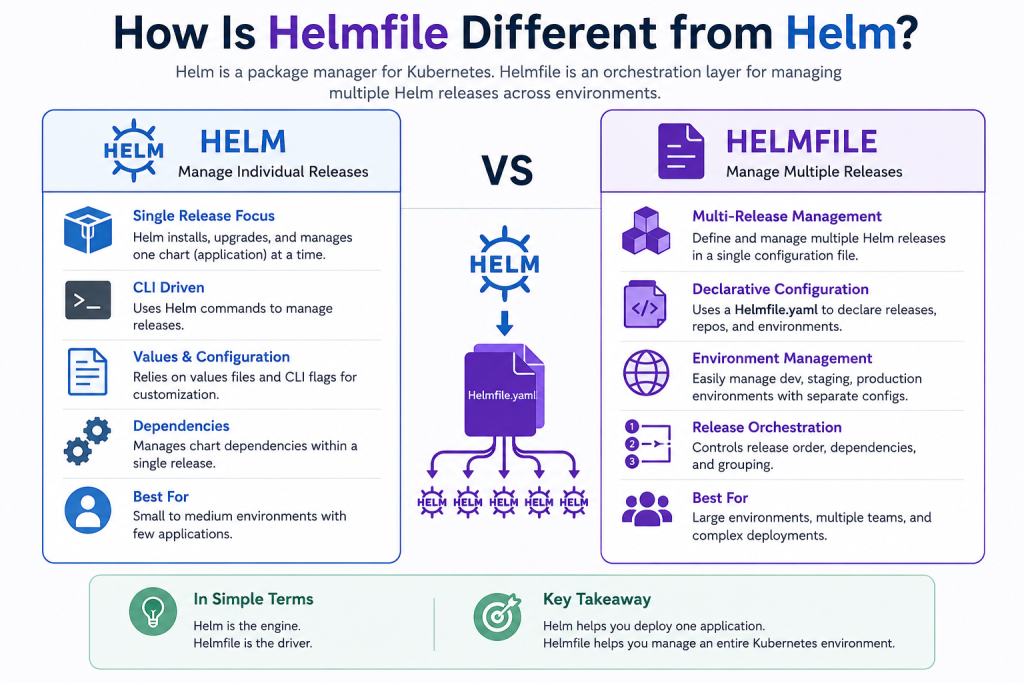
The biggest difference is that Helm focuses on managing individual application deployments, while Helmfile focuses on managing collections of Helm deployments.
With Helm, each application release is typically managed separately. You install, upgrade, and maintain every chart individually.
With Helmfile, multiple Helm releases can be defined in a single file, allowing teams to manage an entire Kubernetes environment as code.
Think of Helm as the engine that performs deployments, while Helmfile acts as an orchestration layer that organizes and coordinates multiple Helm deployments.
Configuration Management
Helm relies on values files and command-line arguments to customize deployments. This works well for small projects but can become difficult to maintain when multiple environments are involved.
Helmfile centralizes configuration management. It allows teams to define staging, development, testing, and production environments in one place. Environment-specific values can be stored separately and automatically applied during deployment.
This structure reduces duplication and makes deployments more predictable.
Managing Multiple Releases
One of Helmfile’s biggest advantages is its ability to manage multiple releases simultaneously.
Imagine a Kubernetes environment containing:
- NGINX Ingress Controller
- Prometheus
- Grafana
- Redis
- PostgreSQL
- Several microservices
Using Helm alone, each component requires separate installation and upgrade commands.
With Helmfile, all releases can be defined in one configuration file. Running a single command synchronizes the entire environment.
This saves time and minimizes the risk of configuration inconsistencies.
Dependency Handling
Helm supports chart dependencies, allowing one chart to depend on another. However, managing dependencies between multiple independent releases can become complicated.
Helmfile provides better visibility and coordination for release ordering. Teams can specify deployment sequences and ensure services are installed in the correct order.
This feature is particularly valuable for complex microservices architectures.
Environment Management
Modern applications often require separate development, staging, and production environments.
Helm can support multiple environments through separate values files, but managing them manually can become cumbersome as infrastructure grows.
Helmfile was specifically designed to simplify environment management. It allows users to define environment-specific variables and configurations in a structured manner.
This makes it easier to maintain consistency across different deployment stages.
Team Collaboration Benefits
Helmfile promotes Infrastructure as Code practices by keeping deployment configurations in version control.
Teams can review changes through pull requests, track deployment history, and maintain a clear record of infrastructure modifications.
Since all releases are defined declaratively, onboarding new team members becomes easier because they can understand the entire Kubernetes setup from a single file.
When Should You Use Helm?
Helm is often sufficient when:
- You manage only a few Kubernetes applications.
- Deployments are relatively simple.
- Environment complexity is low.
- You prefer direct control over each release.
For small teams and simple Kubernetes projects, Helm provides everything needed to deploy and manage applications effectively.
When Should You Use Helmfile?
Helmfile becomes valuable when:
- You manage many Helm releases.
- Multiple environments need consistent configurations.
- Infrastructure automation is a priority.
- Team collaboration requires declarative deployment management.
- You want to manage entire Kubernetes environments from a single source of truth.
Organizations operating large-scale Kubernetes platforms often benefit significantly from Helmfile’s capabilities.
Can Helmfile Replace Helm?
Not exactly. Helmfile does not replace Helm because it depends on Helm to perform deployments. Helmfile acts as a wrapper and orchestration layer around Helm.
In other words, Helmfile enhances Helm rather than replacing it. You still need Helm installed because Helmfile uses Helm commands behind the scenes.
Conclusion
Helm and Helmfile serve complementary roles in Kubernetes deployment management. Helm is an excellent package manager for deploying individual applications using charts, while Helmfile provides a higher-level approach for managing multiple Helm releases and environments through declarative configuration.
For small Kubernetes projects, Helm alone is often enough. However, as infrastructure grows and deployment complexity increases, Helmfile can significantly simplify management, improve consistency, and enhance automation. Understanding how Helmfile differs from Helm helps teams choose the right approach for building scalable and maintainable Kubernetes environments.