Managing Kubernetes applications can quickly become complex, especially when multiple Helm charts are involved. This is where Helmfile becomes incredibly useful. If you’ve recently started working with Helm and Kubernetes, you may have come across the term helmfile.yaml and wondered what it actually does.
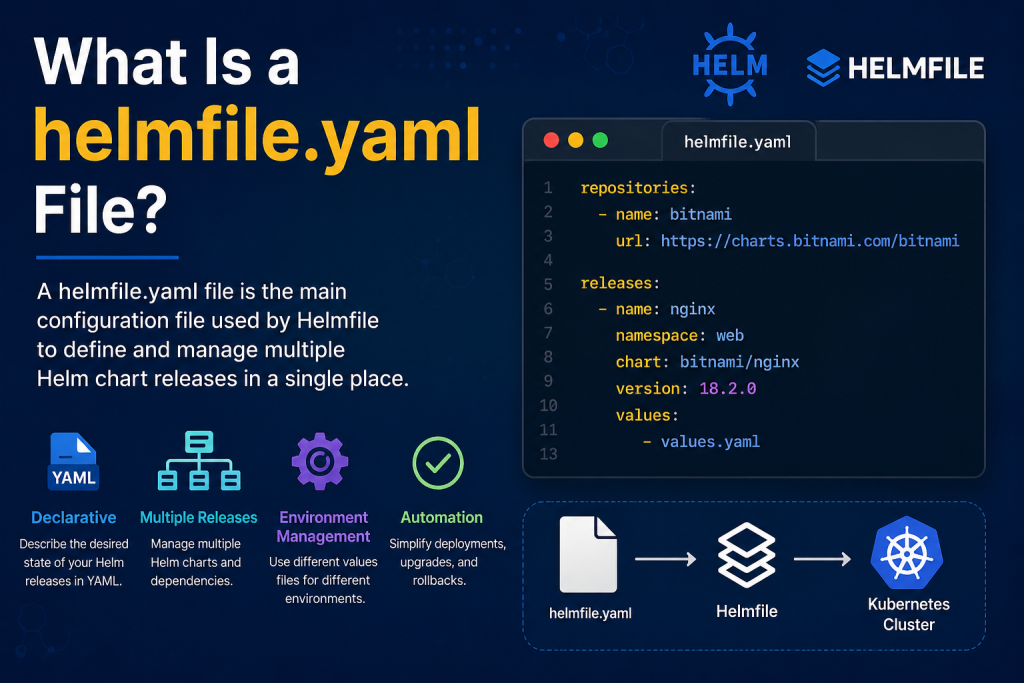
In simple terms, a helmfile.yaml file is the main configuration file used by Helmfile to define, organize, and manage multiple Helm chart deployments in a single place. It allows teams to maintain consistency across environments while reducing repetitive commands and configuration errors.
Read More: How Does Helmfile Manage Multiple Helm Charts?
Understanding Helmfile
Before diving into the helmfile.yaml file, it’s important to understand Helmfile itself. Helmfile is an open-source tool that helps users manage collections of Helm charts declaratively. Instead of manually running numerous Helm commands, you can describe the desired state of your Helm releases in a YAML file and let Helmfile handle the rest.
This approach is especially valuable in production environments where applications consist of multiple services deployed through separate Helm charts.
What Does the helmfile.yaml File Do?
The helmfile.yaml file acts as a blueprint for your Kubernetes deployments. It tells Helmfile which Helm charts should be installed, upgraded, or removed, and how they should be configured.
Rather than executing individual commands for every release, you define everything in one centralized file. When you run a Helmfile command, Helmfile reads the helmfile.yaml file and synchronizes your Kubernetes cluster with the desired configuration.
This file improves automation, enhances consistency, and makes infrastructure easier to maintain.
Typical Information Found in a helmfile.yaml File
A helmfile.yaml file can include several important elements, such as:
- Helm repositories that contain the charts you want to use
- Release definitions for each application or service
- Namespaces where applications should be deployed
- Version numbers for Helm charts
- Custom values files containing environment-specific settings
- Dependencies between releases
These configurations help ensure that every deployment follows the exact specifications defined by your team.
Example of a Basic helmfile.yaml File
Below is a simple example of what a helmfile.yaml file may look like:
repositories:
  - name: bitnami
    url: https://charts.bitnami.com/bitnami

releases:
  - name: nginx
    namespace: web
    chart: bitnami/nginx
    version: 18.2.0
    values:
      - values.yaml
In this example, Helmfile adds the Bitnami repository and deploys an NGINX release into the web namespace using specific chart values.
Benefits of Using helmfile.yaml
One of the biggest advantages of using helmfile.yaml is improved organization. Instead of maintaining long deployment scripts, you can keep everything documented in a single file.
Another major benefit is reproducibility. Team members can deploy the same applications with identical configurations across development, staging, and production environments.
The file also supports environment-specific settings, making it easier to customize deployments without duplicating entire configurations.
Additionally, Helmfile provides features such as diff checking, which allows you to preview changes before applying them to your cluster.
helmfile.yaml vs Helm Values Files
Many beginners confuse helmfile.yaml with Helm’s values.yaml file. Although both use YAML syntax, they serve different purposes.
A values.yaml file contains configuration values for a single Helm chart. In contrast, helmfile.yaml manages multiple Helm releases and their relationships.
You can think of values.yaml as configuring one application, while helmfile.yaml orchestrates the deployment of many applications together.
Common Use Cases
Organizations often use helmfile.yaml when managing microservices architectures where several applications need to be deployed simultaneously.
It is also widely used in continuous integration and continuous deployment pipelines because it simplifies deployment automation.
Development teams appreciate Helmfile for its ability to keep infrastructure configurations under version control, enabling easier collaboration and auditing.
Best Practices for Managing helmfile.yaml
To get the most value from Helmfile, store your helmfile.yaml files in a version control system such as Git. This makes it easier to track changes and roll back configurations when necessary.
Separate environment-specific values into dedicated files to keep your helmfile.yaml clean and maintainable.
Regularly review chart versions and dependencies to ensure your deployments remain secure and up to date.
Finally, use Helmfile’s planning and diff capabilities before applying changes to production environments.
Conclusion
A helmfile.yaml file is a powerful tool for anyone managing multiple Helm charts in Kubernetes. It provides a declarative way to define deployments, improve consistency, and simplify operational workflows.
Whether you’re working on a small Kubernetes project or maintaining a large-scale production environment, understanding how helmfile.yaml works can significantly streamline your deployment process. By centralizing your Helm configurations, you gain better control, improved collaboration, and a more reliable infrastructure management experience.