Managing multiple environments like development, staging, and production is a common challenge in Kubernetes-based systems. Each environment has different requirements, configurations, and levels of stability, which can quickly become complex to manage manually. Helmfile solves this problem by providing a structured and declarative way to handle environment-specific deployments.
Instead of maintaining separate deployment scripts, Helmfile allows you to define all environments in a single configuration file and customize them using values, overrides, and templating. This ensures consistency, reduces human error, and makes deployments more predictable. In this article, we’ll explore how Helmfile efficiently manages dev, staging, and production environments.
Read More: What Is the Difference Between helmfile sync and helmfile apply?
Understanding the Role of Helmfile in Kubernetes
Before diving into environments, it’s important to understand what Helmfile does.
Helmfile acts as a declarative layer on top of Helm. Instead of running multiple helm install or helm upgrade commands manually, you define everything in a single YAML file.
This file describes:
- Which Helm charts to install
- What values to use
- Which Kubernetes namespaces to target
- How different environments should behave
This makes deployments predictable, repeatable, and much easier to manage.
The Core Idea: Environment Separation in Helmfile
Helmfile manages environments using a concept called environment-specific configuration.
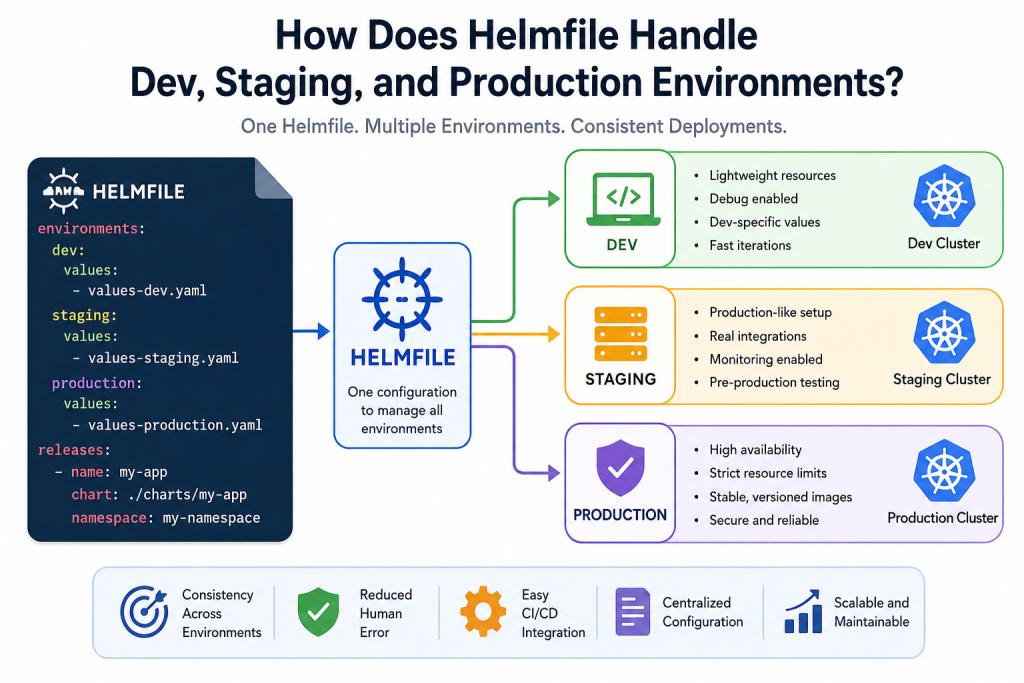
Instead of maintaining separate deployment scripts for dev, staging, and production, you define one Helmfile and then customize behavior using:
- Environments
- Values files
- Conditional logic
- Environment-specific overrides
This approach ensures consistency while still allowing flexibility.
How Dev, Staging, and Production Are Structured
Development Environment (Dev)
The development environment is where frequent changes happen. Helmfile supports this by allowing:
- Fast deployments with minimal restrictions
- Local or test cluster configurations
- Debug-friendly settings
- Reduced resource requests
Typically, in Helmfile, dev configurations:
- Use lightweight replicas
- Enable debug logs
- Point to development databases or mock services
Example behavior:
replicaCount: 1image.tag: dev-latestingress.enabled: false(sometimes)
This ensures developers can test quickly without worrying about production-level constraints.
Staging Environment
Staging acts as a mirror of production. Helmfile handles this by allowing near-production configurations with slight flexibility.
In staging:
- Production-like settings are reused
- Real integrations may be tested
- Monitoring and logging are enabled
- Slight scaling differences may exist
Helmfile typically uses:
- Separate values file like
values-staging.yaml - Same chart version as production
- Controlled overrides only where necessary
Example:
replicaCount: 2image.tag: release-candidateingress.enabled: true
This environment is essential for testing real-world behavior before production release.
Production Environment (Prod)
Production is where stability matters most. Helmfile ensures production configuration is strict, controlled, and predictable.
In production:
- Only stable chart versions are deployed
- Strict resource limits are enforced
- High availability is enabled
- Rollback safety is prioritized
Helmfile usually applies:
- Dedicated
values-production.yaml - Version pinning (no “latest” tags)
- Strong scaling rules
Example:
replicaCount: 5+image.tag: v1.2.3autoscaling.enabled: true
This ensures reliability and performance under real traffic.
How Helmfile Technically Manages Environments
Helmfile uses a combination of features to handle multiple environments efficiently:
Environment Blocks
You can define environments directly in the Helmfile:
environments:
  dev:
    values:
      - values-dev.yaml

  staging:
    values:
      - values-staging.yaml

  production:
    values:
      - values-production.yaml
This tells Helmfile which configuration files to load based on the selected environment.
Templating and Conditional Logic
Helmfile supports Go templating, which allows dynamic behavior:
replicaCount: {{ if eq .Environment.Name "production" }}3{{ else }}1{{ end }}This means a single file can behave differently depending on the environment.
Layered Values System
Helmfile merges values in layers:
- Base values (common for all environments)
- Environment-specific overrides
- Command-line overrides (if any)
This layering ensures:
- No duplication
- Easy maintenance
- Clear override hierarchy
Selective Releases
Helmfile can also enable or disable services per environment:
releases:
  - name: monitoring
    enabled: {{ eq .Environment.Name "production" }}
This is useful when certain tools should only run in production.
Benefits of Using Helmfile for Multi-Environment Setup
Using Helmfile for dev, staging, and production offers several advantages:
Consistency Across Environments
All environments use the same Helm charts, reducing configuration drift.
Reduced Human Error
No manual Helm commands means fewer deployment mistakes.
Easier CI/CD Integration
Helmfile works smoothly with pipelines, making automation simple.
Centralized Configuration
Everything is managed in one place instead of scattered scripts.
Scalable Architecture
As your system grows, Helmfile scales without adding complexity.
Best Practices for Environment Management in Helmfile
To get the most out of Helmfile:
- Always separate environment values clearly
- Avoid using “latest” images in production
- Keep staging as close to production as possible
- Use Git-based version control for Helmfile configurations
- Automate deployments using CI/CD pipelines
- Regularly review overrides to avoid drift
Conclusion
Helmfile makes managing dev, staging, and production environments much simpler by introducing structure, consistency, and automation into Kubernetes deployments. Instead of juggling multiple Helm commands or scripts, you define everything in one place and let Helmfile handle environment-specific logic.
With proper configuration, teams can move faster in development, test safely in staging, and deploy confidently to production—all without changing the underlying deployment strategy.
If you’re working with Kubernetes at scale, Helmfile is one of the most practical tools to bring order to multi-environment complexity.