
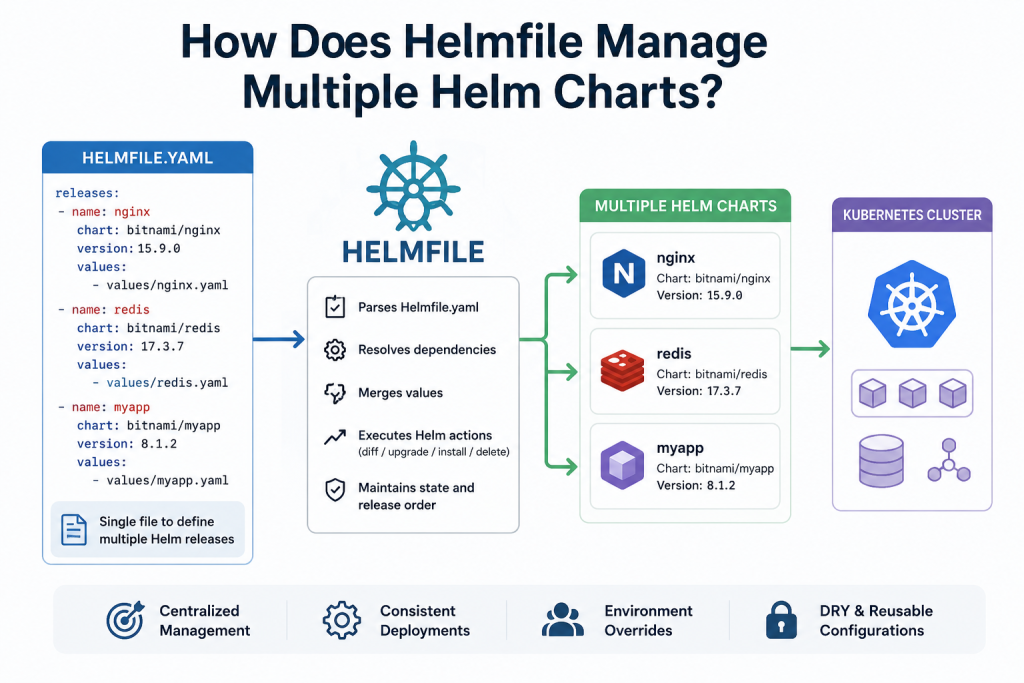
Helmfile is a powerful tool that simplifies managing multiple Helm charts in Kubernetes environments. Instead of deploying each chart separately, it allows users to define all Helm releases in a single declarative configuration file. This makes it easier to control complex applications made up of multiple microservices. Helmfile automatically handles installation, upgrades, and synchronization of charts across different environments like development, staging, and production.
By providing centralized configuration and automation, it reduces manual effort, avoids inconsistencies, and ensures smoother deployments. In short, Helmfile acts as a management layer that organizes and orchestrates multiple Helm charts efficiently and reliably.
Read More: How Is Helmfile Different from Helm?
What is Helmfile?
Helmfile is a declarative tool used to manage and organize multiple Helm charts in one place. Instead of running multiple helm install or helm upgrade commands manually, Helmfile lets you define everything in a single configuration file.
It acts as a “control layer” on top of Helm, making deployments more predictable, repeatable, and scalable.
Helmfile is especially useful in environments where you have:
- Multiple microservices
- Separate environments (dev, staging, production)
- Complex dependency structures
What Problem Does Helmfile Solve?
Without Helmfile, managing multiple charts in Kubernetes can become messy:
- You run many Helm commands manually
- You manage separate values files for each service
- You risk configuration inconsistencies
- You repeat commands across environments
Helmfile solves these issues by introducing a single source of truth for all deployments.
How Helmfile Manages Multiple Helm Charts
Helmfile works by defining all your Helm releases in a YAML file called helmfile.yaml.
This file contains:
- Chart names
- Repositories
- Values files
- Release versions
- Environment-specific configurations
Instead of deploying charts one by one, Helmfile reads this file and executes everything automatically.
Centralized Configuration
The core feature of Helmfile is centralization.
You define all your Helm releases in one file like this:
- App A (frontend)
- App B (backend)
- Database
- Monitoring tools
This gives you a single place to manage everything.
Example structure:
- frontend chart
- backend chart
- database chart
- ingress controller
Helmfile processes them in one go.
Declarative Approach
Helmfile uses a declarative model. You don’t tell it how to deploy step-by-step. Instead, you define what you want, and Helmfile ensures the cluster matches that state.
This approach is similar to how Kubernetes itself works.
If something is missing, Helmfile installs it.
If something is outdated, Helmfile upgrades it.
If something is extra, it can even remove it (if configured).
Environment Management (Dev, Staging, Production)
One of the biggest advantages of Helmfile is environment separation.
You can define different configurations for:
- Development environment
- Staging environment
- Production environment
Each environment can use:
- Different values files
- Different replicas
- Different resource limits
For example:
- Dev → lightweight configuration
- Production → high availability configuration
This avoids duplication and reduces errors.
Dependency Handling Between Charts
In real-world systems, applications depend on each other.
For example:
- Backend depends on database
- Frontend depends on backend API
Helmfile helps manage these dependencies by:
- Ordering deployments
- Grouping related charts
- Ensuring correct startup sequence
This prevents failures caused by missing dependencies.
Batch Deployment of Multiple Charts
Instead of deploying each chart manually, Helmfile allows batch execution.
With a single command:
helmfile applyIt will:
- Install missing charts
- Upgrade existing ones
- Sync the entire system
This is extremely useful in CI/CD pipelines.
Version Control and Rollbacks
Since everything is defined in YAML files, Helmfile integrates well with Git.
You can:
- Track changes in Helm releases
- Roll back configurations easily
- Compare environments
- Audit deployment history
This makes it a strong fit for GitOps workflows.
Integration with CI/CD Pipelines
Helmfile is commonly used in automated pipelines.
In CI/CD workflows, Helmfile:
- Pulls the latest configuration
- Applies changes automatically
- Ensures consistency across environments
This reduces human error and speeds up deployments significantly.
Example: Managing Multiple Charts in Helmfile
A simple helmfile.yaml might look like:
- frontend app chart
- backend API chart
- PostgreSQL database chart
- NGINX ingress controller
Instead of running four separate Helm commands, Helmfile manages them all together.
Benefits of Using Helmfile
Here are the key advantages:
Simplified Management
You manage everything from one file.
Reduced Complexity
No need to remember multiple Helm commands.
Better Consistency
All environments follow the same structure.
Automation Ready
Works perfectly with CI/CD pipelines.
Scalable Architecture
Easily handle dozens or hundreds of charts.
Helmfile vs Helm Alone
| Feature | Helm | Helmfile |
|---|---|---|
| Single chart deployment | Yes | Yes |
| Multiple charts management | No | Yes |
| Environment handling | Limited | Advanced |
| Automation support | Medium | High |
| Configuration centralization | No | Yes |
Helm is great for single applications, but Helmfile is designed for large-scale systems.
When Should You Use Helmfile?
Helmfile is ideal when:
- You manage multiple microservices
- You work with multiple Kubernetes environments
- You need consistent deployments
- You use GitOps practices
- You want automation in CI/CD pipelines
If you only deploy one or two applications, Helm alone may be enough. But for complex systems, Helmfile becomes essential.
Conclusion
Helmfile simplifies Kubernetes management by acting as a central controller for multiple Helm charts. It removes manual work, reduces errors, and brings structure to large deployments.
By combining the power of Helm and Kubernetes, Helmfile enables teams to manage infrastructure in a clean, scalable, and automated way.
If you’re dealing with multiple services in Kubernetes, adopting Helmfile can significantly improve your deployment workflow and operational efficiency.