
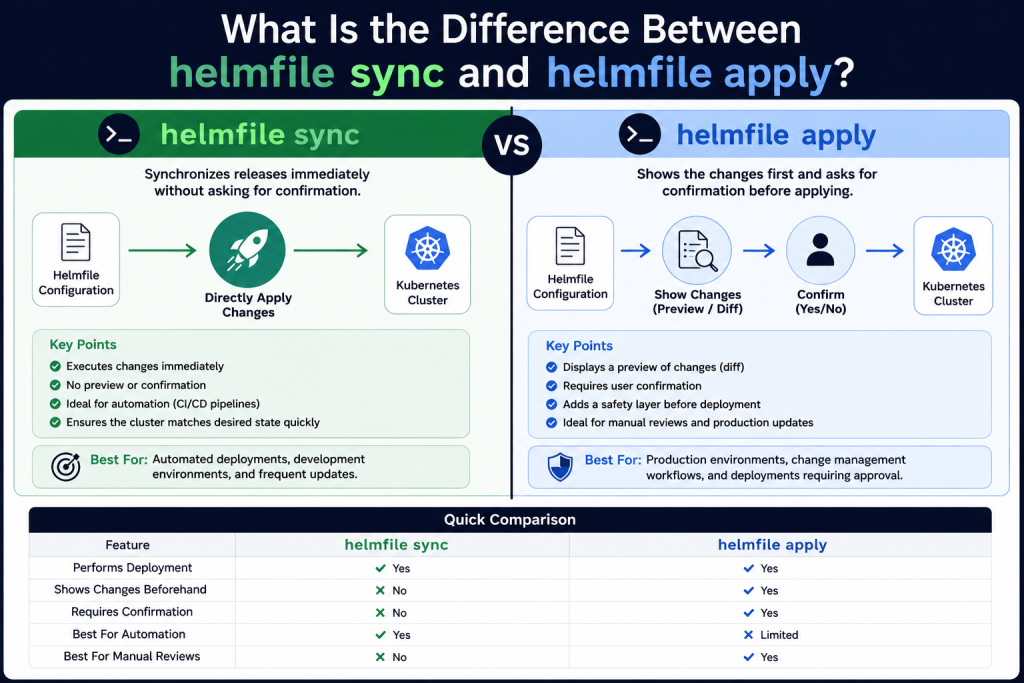
Helmfile is a powerful tool used to manage multiple Helm charts in Kubernetes environments, helping teams define and maintain infrastructure as code. When working with Helmfile, two commonly used commands are helmfile sync and helmfile apply. Although both are used to align your cluster with the desired state defined in a Helmfile configuration, they work differently in execution and safety.
Sync applies changes directly without confirmation, making it ideal for automation, while apply shows a diff and requires approval before proceeding. Understanding these differences helps developers choose the right command for safer and more efficient deployments in Kubernetes production workflows.
Read More: How Do I Install and Configure Helmfile?
Understanding Helmfile
Helmfile is a tool that simplifies the management of multiple Helm charts and releases. Instead of manually running Helm commands for every application, you define your desired state in a helmfile.yaml file. Helmfile then ensures that your Kubernetes cluster matches that configuration.
Two of the most commonly used commands in Helmfile are sync and apply.
What Does helmfile sync Do?
The helmfile sync command immediately synchronizes the releases defined in your Helmfile with your Kubernetes cluster.
When you run this command, Helmfile installs new releases, upgrades existing ones, and removes releases that are no longer defined if deletion is enabled. The key characteristic of sync is that it performs these actions without asking for confirmation.
For example:
helmfile syncThis command directly applies the changes required to bring the cluster into the desired state described in the Helmfile configuration.
Key Features of helmfile sync
- Executes changes immediately.
- Does not display a detailed preview before deployment.
- Suitable for automated environments such as CI/CD pipelines.
- Helps maintain the declared state of your infrastructure.
What Does helmfile apply Do?
The helmfile apply command takes a more cautious approach. Before making any changes, it first performs a diff operation to show what modifications will occur.
After presenting the differences, Helmfile asks for confirmation before proceeding with the deployment.
Example:
helmfile applyYou’ll typically see output indicating what resources will be added, modified, or removed. Once you review the changes, you can approve them to continue.
Key Features of helmfile apply
- Displays a preview of pending changes.
- Requires user confirmation before execution.
- Reduces the risk of accidental deployments.
- Ideal for manual production updates and review processes.
The Main Difference Between helmfile sync and helmfile apply
The primary distinction lies in the review process.
helmfile sync skips the preview stage and directly synchronizes your releases. In contrast, helmfile apply checks for differences first and gives you an opportunity to verify the planned actions before they take effect.
| Feature | helmfile sync | helmfile apply |
|---|---|---|
| Performs deployment | Yes | Yes |
| Shows changes beforehand | No | Yes |
| Requires confirmation | No | Yes |
| Best for automation | Yes | Limited |
| Best for manual reviews | No | Yes |
When Should You Use helmfile sync?
Use helmfile sync when speed and automation are your priorities.
This command works particularly well in continuous integration and continuous deployment pipelines where deployments are tested beforehand and human intervention is unnecessary.
Common use cases include:
- Automated deployments in CI/CD systems.
- Development environments with frequent updates.
- Situations where the desired state is already validated.
When Should You Use helmfile apply?
Choose helmfile apply when you need greater visibility into the changes being introduced.
Production environments often benefit from this approach because administrators can review the proposed updates before approving them.
Common scenarios include:
- Production deployments.
- Change management workflows.
- Teams that require deployment approval processes.
- Environments where minimizing risk is essential.
Which Command Is Safer?
From a risk management perspective, helmfile apply is generally considered safer because it allows you to inspect the changes before they happen.
However, that doesn’t mean helmfile sync is unsafe. In well-tested automated pipelines, sync can be both efficient and reliable. The best choice depends on your operational practices and deployment strategy.
Conclusion
Both helmfile sync and helmfile apply are essential commands in Helmfile, but they serve different purposes in deployment workflows. sync focuses on speed and automation by directly applying changes to your Kubernetes cluster, making it ideal for CI/CD pipelines and routine updates. On the other hand, apply adds a safety layer by showing a preview of changes and requiring confirmation before execution, which is especially useful in production environments. Choosing between them depends on your workflow needs—whether you prioritize fast automation or controlled, review-based deployments.