Managing Kubernetes deployments can quickly become complex when you have multiple environments like development, staging, and production. This is where Helmfile makes things easier by helping you organize and control your Helm charts in a structured way. One of its most useful features is the ability to work with values files, which allow you to separate configuration from your application code.
Instead of manually changing settings for each deployment, you can define different YAML files for different environments and let Helmfile handle the rest. In this article, we’ll explore how values files work in Helmfile and how you can use them effectively to simplify and improve your Kubernetes deployment workflow.
Read More: How Does Helmfile Handle Dev, Staging, and Production Environments?
What Are Values Files in Helmfile?
In simple terms, a values file is a YAML file that contains configuration settings for your Helm charts. Instead of hardcoding settings inside your deployment files, you store them separately and load them dynamically.
When working with Kubernetes, applications often need different configurations depending on the environment.
For example:
- Development may use debug logs
- Staging may mimic production but with test data
- Production requires optimized performance settings
Values files make this separation clean and manageable.
Why Use Values Files in Helmfile?
Using values files in Helmfile offers several important advantages:
Better Organization
Instead of mixing all configurations in one place, you split them into structured files like dev.yaml, staging.yaml, and prod.yaml.
Easy Environment Management
You can switch environments without changing your Helm charts.
Reusability
The same Helm chart can be reused across multiple environments with different configurations.
Safer Deployments
Reducing manual edits lowers the risk of mistakes in production.
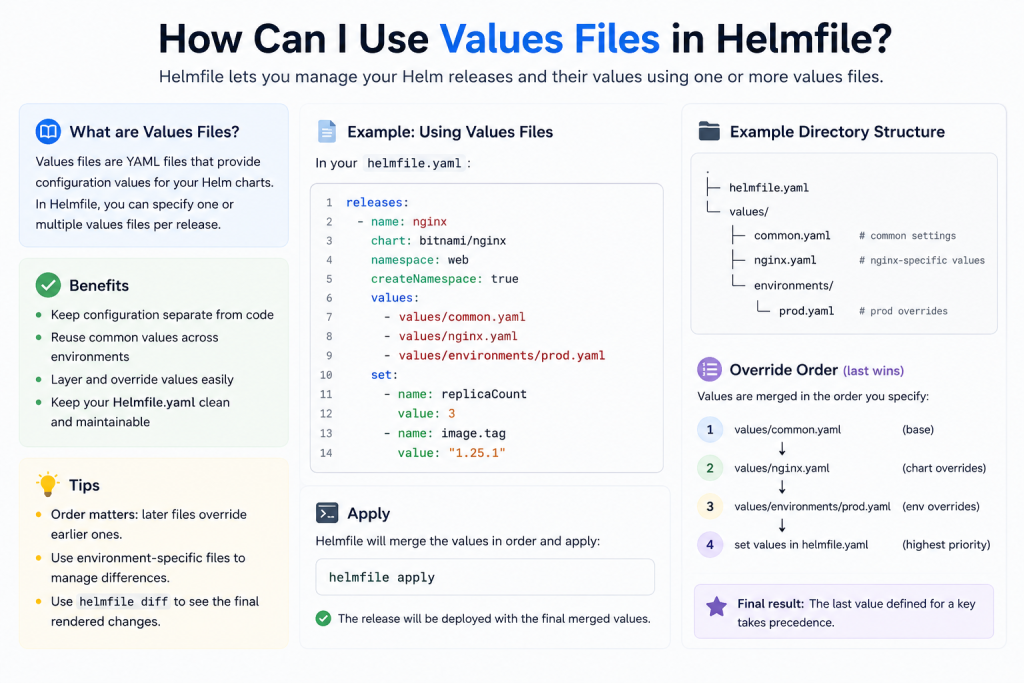
Basic Structure of Helmfile with Values Files
A typical Helmfile setup looks like this:
helmfile.yaml
values/
  dev.yaml
  staging.yaml
  prod.yaml
charts/
  my-app/
Each environment has its own values file, and Helmfile loads them during deployment.
How to Use Values Files in Helmfile
Now let’s look at how to actually use values files inside a Helmfile configuration.
Step 1: Create a Values File
Example: values/dev.yaml
replicaCount: 1

image:
  repository: my-app
  tag: dev-latest

service:
  type: ClusterIP
This file defines development-specific settings.
Step 2: Reference the Values File in Helmfile
Inside your helmfile.yaml, you link the values file like this:
releases:
  - name: my-app
    chart: ./charts/my-app
    values:
      - values/dev.yaml
When you run Helmfile, it automatically applies these values.
Step 3: Use Multiple Values Files
You can also combine multiple values files. This is useful when you want base settings plus environment-specific overrides.
releases:
  - name: my-app
    chart: ./charts/my-app
    values:
      - values/base.yaml
      - values/dev.yaml
Here’s how it works:
base.yamlcontains shared settingsdev.yamloverrides specific values
Advanced Usage: Environment-Based Values in Helmfile
One of the most powerful features of Helmfile is environment support.
You can define environments like this:
environments:
  dev:
    values:
      - values/dev.yaml
  prod:
    values:
      - values/prod.yaml
Then reference the environment in your releases:
releases:
  - name: my-app
    chart: ./charts/my-app
    values:
      - values/common.yaml
      - values/{{ .Environment.Name }}.yaml
Now Helmfile automatically selects the correct values file based on the environment you choose.
Overriding Values from CLI
You can also override values at runtime without modifying files:
helmfile -e dev apply --set replicaCount=3This is useful for quick testing or emergency changes.
Best Practices for Using Values Files
To keep your Helmfile setup clean and scalable, follow these best practices:
Keep a Base Values File
Always maintain a base.yaml for shared configurations.
Separate Sensitive Data
Never store secrets directly in values files. Use secure tools like Kubernetes Secrets or external secret managers.
Use Clear Naming
Stick to consistent names like:
dev.yamlstage.yamlprod.yaml
Avoid Duplication
Only override what is necessary in environment-specific files.
Common Mistakes to Avoid
Many beginners make these mistakes when working with values files:
Overwriting Entire Configurations
Instead of overriding small parts, they replace everything, causing inconsistencies.
Mixing Environments
Using the same values file for multiple environments leads to deployment issues.
Ignoring File Structure
Poor organization makes scaling difficult in large projects.
Real-World Example
Imagine you are deploying an e-commerce app:
- Dev environment uses 1 replica and debug mode
- Staging uses 2 replicas and production-like settings
- Production uses 5 replicas with optimized performance
With Helmfile values files, you simply switch environments without touching the chart itself.
Conclusion
Using values files in Helmfile is a simple yet powerful way to manage configuration across different environments in Kubernetes. Instead of manually editing deployment settings for each release, you can organize everything into structured YAML files and let Helmfile handle the environment-specific overrides.
This approach not only reduces human error but also makes your deployments more consistent, scalable, and easier to maintain. Whether you are working on small projects or large production systems, mastering values files helps you build a cleaner and more reliable DevOps workflow.